ppg-js · Open source · MIT
Camera PPG.
In your browser.
Capture a signal, inspect its quality, and build with heart rate and HRV in the browser. Start with HRV Spot Check, the focused three-minute reference demo.
npm i @sontakey/ppg-js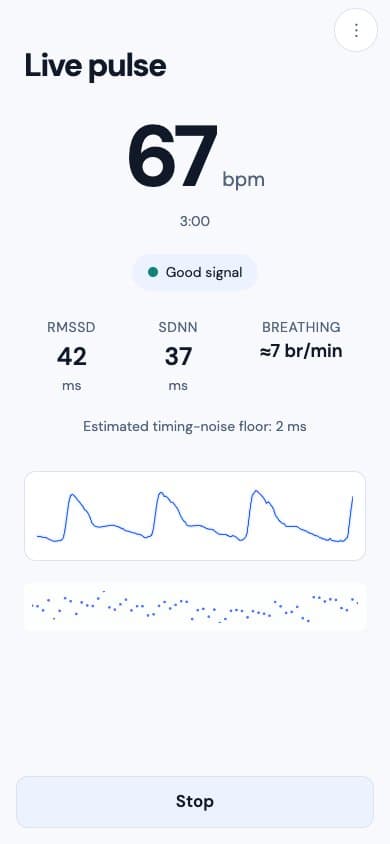
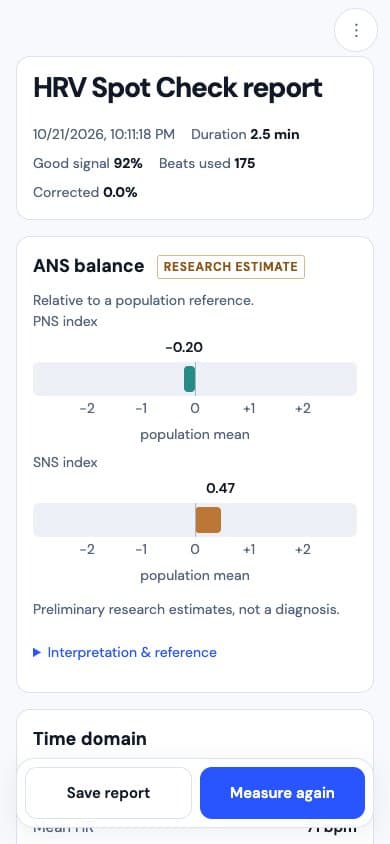
Recorded-session preview
What it can do
ppg-js is a small JavaScript library. You give it a fingertip on a camera, it gives you these:
Heart rate
Live beats per minute, cross-checked two independent ways before a number is ever shown.
Heart-rate variability
RMSSD and SDNN (two standard variability measures) over the last minute, with the measurement noise floor shown next to them.
Breathing rate
Estimated from how your pulse timing and strength shift as you breathe. No chest strap needed.
An honest quality check
Finger not settled, too much motion, weak signal: it tells you what is wrong instead of guessing a number.
Record and replay
Every session can be saved and replayed through the exact same engine, so results are reproducible.
Private by default
No network calls. Camera frames and processing stay on the phone, and nothing is stored unless you ask for it.
Why it's useful
A heart reading normally needs a wearable or a clinic. Here are three things that get easier when a phone camera is enough.
A spot check in a wellness app
Add a 3-minute heart and stress reading to an app people already have. No hardware to buy, ship, or charge.
A classroom or research demo
Show real biosignal processing on devices students already carry. The whole pipeline is open, so every step can be inspected and discussed.
A prototype before you buy sensors
Find out whether camera-based pulse sensing fits your product idea before spending on hardware. The demo doubles as a test bench.
How it works
From white light to pulse metrics: four steps inside a camera-based PPG measurement.
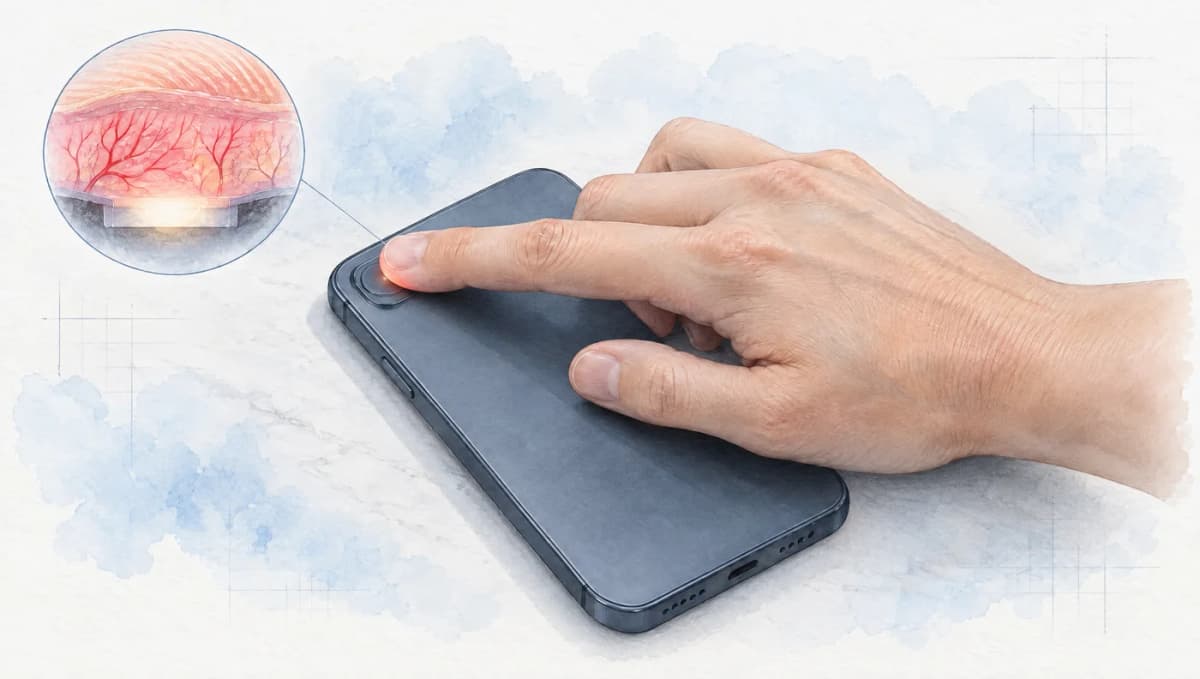
Index fingertipGently cover the rear camera and flash. 01Cover the camera and flash
Rest the pad of your index finger gently over the rear camera and adjacent flash. Keep your hand still and avoid pressing hard.
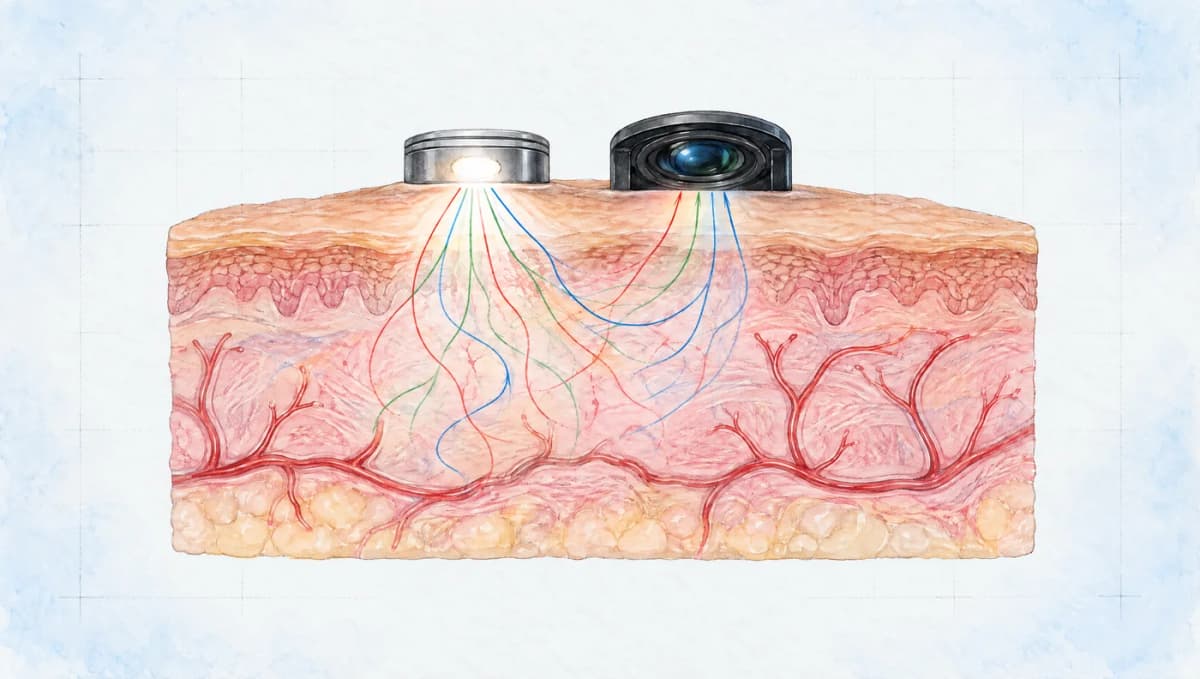
White flashRedGreenBlueBroad visible color bands · paths not to scale 02Blood volume changes the light
The phone's white flash illuminates the tissue. Light scatters and is absorbed; a small fraction reaches the camera. Pulsatile blood-volume changes modulate the detected intensity.
From light to pulse
The camera records brightness variations, including the pulse and unwanted fluctuations.
Synthetic PPG · normalized amplitudes · 4 seconds. A conceptual processing sequence, not a live measurement. 03The camera sees a tiny ripple
The camera's red, green and blue channels capture small brightness changes. The library filters the signal and detects pulse peaks when the recording has sufficient quality.
- Pulse metricsExample values
- Heart rate
- 72 bpm
- Pulse variability · RMSSD
- 32 ms
- Estimated breathing rate
- 14 / min
Illustrative values, not a measurement. Pulse variability is an optical proxy for ECG-derived HRV. 04Estimate metrics. Check the quality.
Estimate heart rate, pulse-interval variability and breathing rate. Quality checks can withhold unreliable results. These are experimental estimates, not clinically validated measurements.
The colored paths represent broad visible bands from a white flash, not separate narrowband LEDs or infrared illumination. Illustrations are not to scale. Optical basis: Matsumura et al., PLOS ONE.
For developers: the full pipeline(the seven processing stages and the quality contract)
PPG means photoplethysmography: measuring blood volume changes with light. The same PpgEngine runs the live camera path and the repo's replay tool, so a recorded session replays to identical windows.
- 1
Camera frame
requestVideoFrameCallback (or requestAnimationFrame as fallback) reads the centre ROI, downscaled, and computes channel means plus the clipped-pixel fraction.
- 2
Finger state machine
Every sample updates NO_FINGER → SETTLING → MEASURING based on relative presence and drift. Exposure, white balance, and focus lock once MEASURING is first reached.
- 3
Windowed analysis (every 5s)
The last 8s is interpolated onto one absolute 60 Hz grid, then zero-phase Butterworth bandpassed (4th-order HP 0.6 Hz, 2nd-order LP 4.6 Hz).
- 4
Channel selection & spectral HR
The channel with the largest pulsatile amplitude is selected. A Hann-windowed, zero-padded FFT with a sub-harmonic guard gives a spectral heart-rate estimate that seeds a refractory prior for peak detection.
- 5
Peak detection & beat validation
Adaptive-threshold peaks with 0.3s vertex fit produce absolute beat times. Missed-beat recovery looks for a weak pulse inside a 2x gap (flagged lowSnr). Template correlation and interval validation run over the continuous stream.
- 6
HR / IBI / HRV / respiration
RMSSD and SDNN are computed over the last 60s of accepted beats; respiration comes from breathing-driven modulation of beat timing, amplitude, and baseline.
- 7
Quality gate
The final verdict: good / reason / code. A number is only reported when every check in the signal quality contract passes.
Signal quality contract: it says why, not just no
quality.good is true only when, in this order, all eight checks hold. reason and code name the first that fails, and heartRate, rmssd, and sdnn are 0 whenever good is false.
| # | Check | Reason code(s) |
|---|---|---|
| 1 | fingerState === 'MEASURING' | no_finger, settling |
| 2 | clipped-pixel fraction ≤ 5% | saturated |
| 3 | device motion ≤ threshold (when attached) | motion |
| 4 | pulsatile AC/DC ≥ 0.2% | weak_pulse |
| 5 | ≤ 20% of candidate intervals rejected in the last 60s | irregular |
| 6 | ≥ 8 accepted intervals in the last 60s | collecting |
| 7 | median template correlation ≥ 0.6 | morphology |
| 8 | interval-based and spectral heart rate agree within 25% | double_count, missed_beats, fft_disagree |
Example verdict
{ good: false, reason: "weak_pulse", code: "weak_pulse" }
// pulsatile AC/DC is below 0.2%: press a little firmer on the
// lens, or check the flash actually turned on.
Quick start
Three ways in, depending on how you build. Each one is the real API, copied from the README.
1. No bundler: one script tag
<script src="https://unpkg.com/@sontakey/ppg-js/dist/index.global.js"></script>
<script>
  const ppg = new PPG.PPG();
  ppg.addEventListener('metrics', (e) => {
    console.log(e.detail.heartRate, e.detail.quality);
  });
  // Camera permission needs a user gesture.
  document.querySelector('#start').onclick = () => ppg.start();
</script>
2. npm, plain JavaScript
npm install @sontakey/ppg-js, then listen for state transitions and metrics, and call start() from a tap.
import { PPG } from '@sontakey/ppg-js';

const ppg = new PPG();

ppg.addEventListener('state', (e) => {
  // NO_FINGER -> SETTLING -> MEASURING
  console.log(e.detail.state, e.detail.reason);
});

ppg.addEventListener('metrics', (e) => {
  const m = e.detail;
  if (!m.quality.good) {
    console.log('not ready:', m.quality.reason, m.guidanceMessage);
    return;
  }
  console.log(
    `${m.heartRate} bpm, RMSSD ${m.rmssd.toFixed(0)} ms`,
    `(noise floor ±${m.rmssdFloorMs.toFixed(0)} ms)`,
  );
});

// Call from a user gesture (tap): camera, wake lock and motion permission all need one.
button.onclick = () => ppg.start();
3. React hook
import { useEffect, useRef, useState } from 'react';
import { PPG } from '@sontakey/ppg-js';

export function usePulse() {
  const ppgRef = useRef<PPG | null>(null);
  const [bpm, setBpm] = useState(0);
  const [status, setStatus] = useState('Tap start, then cover the camera');

  useEffect(() => {
    const ppg = new PPG();
    ppgRef.current = ppg;
    ppg.addEventListener('metrics', (e) => {
      const m = e.detail;
      if (m.quality.good) setBpm(m.heartRate);
      else setStatus(m.guidanceMessage);
    });
    return () => ppg.destroy();
  }, []);

  // Call from a button's onClick: the camera needs a user gesture.
  const start = () => ppgRef.current?.start();
  return { bpm, status, start };
}Accuracy and limits
In plain words: heart rate is reliable in the tested range, variability readings carry a noise floor that is always shown next to them, and the library has not been clinically validated. The numbers below come from the library's own test suite: a signal simulator, plus six real iPhone recordings.
| Case | Result |
|---|---|
| Heart rate, 60-90 bpm, 24/30/60 fps | within 1 bpm |
| RMSSD floor on a zero-variability pulse, fractional ROI means | 9-13 ms (bound 15 ms) |
| Same with whole-count quantised means | 11-16 ms (bound 22 ms) |
| 10% dropped frames | raises RMSSD by < 2 ms (bound 5 ms) |
| Respiration at 6 breaths/min | 6.0 ± 1 |
| Live vs replay, 3 min session (real recording) | 212 of 212 beats reproduced |
| Time to first heart rate, clean start (real recording) | 10s after MEASURING (20s after finger placement) |
Not validated: no ECG or chest-strap comparison across a population, no claim across skin tones or ambient light beyond the recordings in test/fixtures/. This is not a medical device. It is for research and personal curiosity, not diagnosis, treatment, or any decision that needs a validated instrument. Requires HTTPS (or localhost) and getUserMedia.
Where it works
Any modern phone browser with a rear camera. Desktop works for development, but without a flash the signal is weak.
| Platform | Camera | Flash (torch) | Notes |
|---|---|---|---|
| iOS Safari 17+ and every iOS browser (WebKit) | Yes | Yes | The engine locks exposure and white balance itself, since iPhones do not expose exposureMode. |
| Android Chrome | Yes | Yes | Torch, exposure/white-balance/focus locks, zoom, Web Bluetooth. Lens selection by label is best-effort. |
| Desktop Chrome/Edge/Firefox | Yes | No | Works with a desk lamp for development; not a measurement setup. |
| In-app browsers (Instagram, Facebook, some WebViews) | Often no | No | start() rejects with unsupported. |
The ppg-js reference demo
HRV Spot Check
A focused example of camera-based pulse capture. Follow the live waveform and signal quality, then inspect your heart rate and HRV report. Use the same headless ppg-js library to build your own interface.
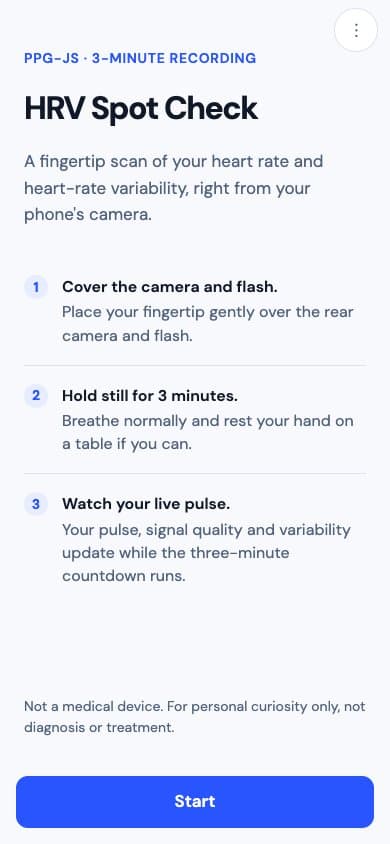
Interface previews replay a recorded session with mocked camera input. For personal curiosity, not diagnosis.

Try it on your phone.
Open your phone’s camera and scan the code. A rear camera and flash work best.
chatppg.com/ppg-js-demoA project by ChatPPG · Powered by ppg-js
Pulse Painting
A landscape drawn from your pulse. Watch accepted pulse waveforms form one of 16 painted scenes, then zoom out to reveal the whole painting.
More usable recording time adds layers and detail. The scene and colors are artistic choices; rejected signal adds no paint. Share the finished landscape when your recording ends.
Open Pulse PaintingExplore the Pulse Painting project
Example artwork comes from a public pulse recording. Not a medical device.

Actual Pulse Painting artwork from a public pulse recording.
FAQ
Does it work on desktop?
The headless library can use a desktop camera for development. For an HRV Spot Check, use a phone's rear camera and flash. Pulse Painting is a separate creative project built with the library.
iPhone or Android, does it matter?
Both work. iPhones need iOS 17 or later, and every iOS browser uses the same WebKit engine underneath. Android Chrome adds zoom control and Bluetooth chest-strap support for validation.
Is it accurate?
In the test suite, heart rate lands within 1 bpm on simulated signals, and a 3-minute real iPhone session reproduced 212 of 212 beats on replay. It has not been validated across a population or across skin tones.
Is it a medical device?
No. It is for research and personal curiosity. Do not use it for diagnosis, treatment, or any decision that needs a validated instrument.
Does my data leave the phone?
No. The library makes no network calls. Camera frames and all processing stay in the browser, and nothing is stored unless you turn on the debug log yourself.
How does it compare to a wearable?
A wearable measures all day with a purpose-built sensor; ppg-js gives a 3-minute spot check from a phone camera. You can record a Bluetooth chest strap alongside it to judge accuracy on your own device.
Can I use it with React or plain JavaScript?
Yes. The library renders no UI and works with any framework, or none. There is an npm package for bundlers and a single-file browser build you can drop in with a script tag.
What is the license?
MIT. Free for personal and commercial use.
How can I contribute?
Android recordings are the most valuable contribution right now, since testing so far is concentrated on one iPhone. See CONTRIBUTING.md in the repository.
Why does it sometimes refuse to show a number?
Because the signal was not clean enough to trust. The quality gate checks finger placement, light, motion, and pulse strength, and tells you which check failed so you can fix it.
Does it need HTTPS?
Yes. Browsers only allow camera access on HTTPS or localhost. The demo is hosted on this site at /ppg-js-demo; a copy also runs at ppg-js.vercel.app.
Credits
ppg-js is open source and MIT licensed. See CONTRIBUTING.md to get involved, Android recordings are the most valuable current contribution.